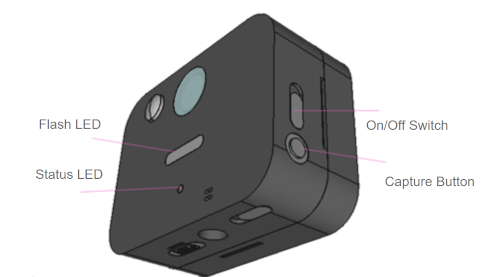
Camera Status LED Indications
Q
What do the status LED lighting and blinking patterns during shooting and sending mean?
They indicate the following states.
Status LED behavior |
Description |
Status |
|---|---|---|
Blinking green |
Camera is operating |
Operating |
Solid green (about 2 seconds) |
Photo upload succeeded |
Normal |
Blinking red (1 time) |
Configuration error in the camera |
Error |
Blinking red (3 times) |
Failed to read the temperature/humidity sensor |
Error |
Blinking red (4 times) |
Failed to take a photo |
Error |
Blinking red (5 times) |
Upload failed |
Error |
Blinks in the order red, orange, red |
SIM card error (please check the SIM card) |
Error |
Blinks in the order red, orange, orange, red |
LTE error (please try in a location with good signal) |
Error |
Blinks in the order red, orange, orange, orange, red |
LTE error (please try in a location with good signal) |
Error |